
[3D SCAN] Product Information: Geomagic Control X 2026.1 The Latest Update that Takes Automation and Multi-Scanner Support to the Next Level
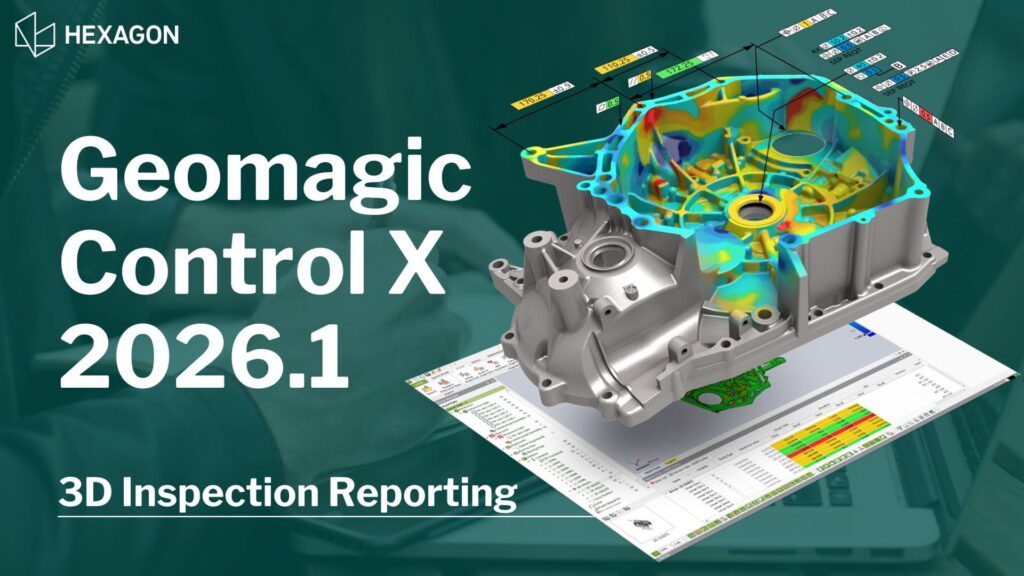
Quality control utilizing 3D scan data is indispensable. However, has the “hassle of switching software for each different brand of hardware” or the “compatibility issues between CAD data and the latest scanner data” become a bottleneck in your inspection process?
The latest version, Geomagic Control X 2026.1 (released in May 2026), directly addresses these challenges, delivering measurement automation, enhanced device compatibility, and unparalleled reliability.
Geomagic Control X 2026.1 Features
Limitless Connectivity: Scanner Direct Control & Hardware Support
The core enhancement of version 2026.1 is breaking down the barriers between hardware and software, enabling direct scanner control in real-time and reducing tedious data transfer steps.
Dramatic Expansion of Scanner Direct Control (Direct Plug-In)
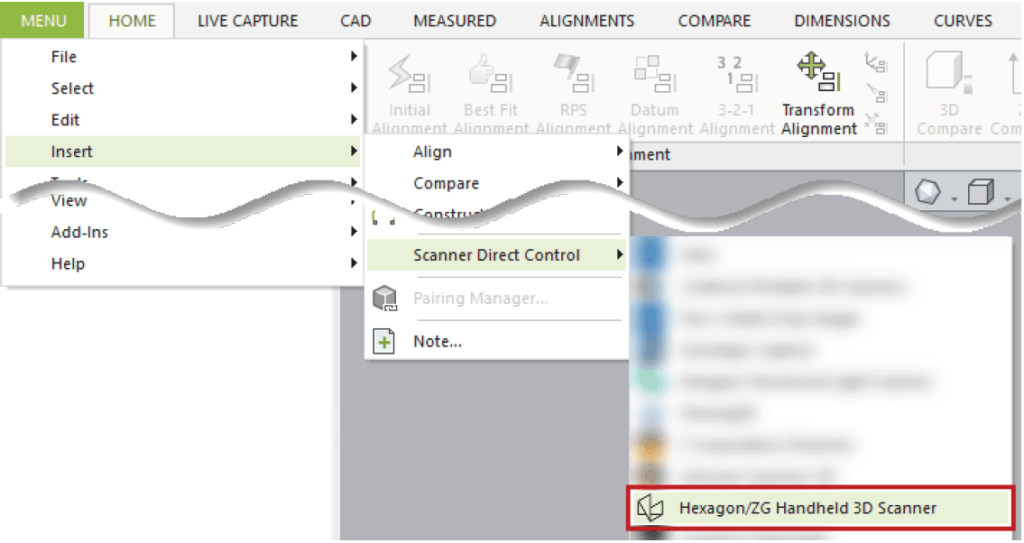
Plug-in that allow you to control portable metrology devices directly from within Geomagic Control X, without relying on external software, have been significantly enhanced.
- New ZG Handheld Devices Plug-In: Scan properties of HHScan can now be operated directly within the software. Supports ATLAS CAN, MARVELSCAN & HYPERSCAN series. (Support for CERESCAN and RIGELSCAN models is limited to specific geographic regions.) This allows instant access to scanning functions directly from the Geomagic interface.
- New HyperProbe Plug-In: HyperProbe can now be controlled directly via LiveInspect. Note: HHScan version 2026.3 or later must be installed before using the HyperProbe plug-in.
- RDS 6.6 Upgrade for Hexagon Arms: A major turning point for those scanning challenging workpieces. The RDS 6.6 upgrade introduces support for Grayscale line scanning, making scan data visualization much clearer. It also supports Unicode for project names and file paths, facilitating international workflows.
Automation Revolution: Text and Visual Scripting Enhancements
We have entered the era of the Smart Factory where automation is key. In this new version, the intelligence of the scripting system has taken a giant leap forward.
- Pause-and-Select Workflow: Scripts in this version can intelligently “pause and wait” for users to select an Area of Interest (AOI) before resuming work. This makes automated processes highly flexible and capable of handling complex real-world tasks.
- Concave/Convex Query Logic: This is an expert-level feature that elevates script intelligence. The system can detect whether a shape (such as a cylinder or sphere) is “convex” or “concave,” allowing you to immediately create conditional paths in automated workflows (rule-based logic).
- Scripted Mesh Cleanup: Mesh cleanup can now be automated via scripts, saving time spent manually deleting unwanted points one by one.
Professional Mesh Management: Mesh Splitting and Decimation Enhancements
In the new version, scan data processing speed and accuracy have been significantly improved.
- Mesh Splitting: Multiple splitting tools can now be used simultaneously in a single command. It also supports splitting using 3D curves, vastly improving splitting precision and processing speed for workpieces with complex curvature.
- Decimation (Polygon Reduction):
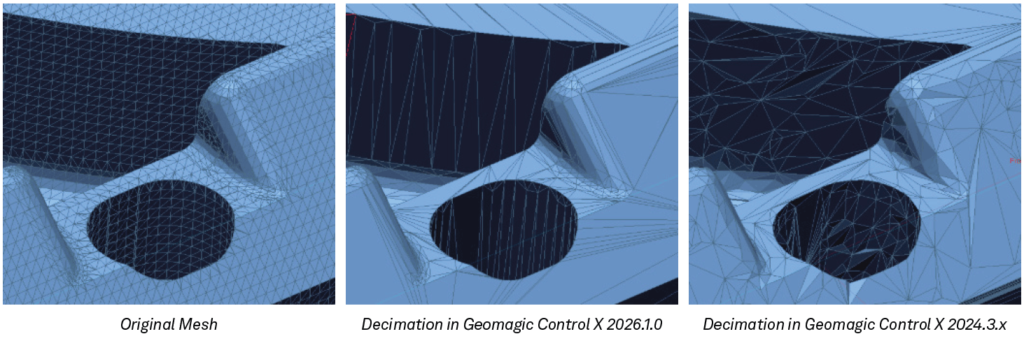 The new algorithm is 2 to 4 times faster. Crucially, it incorporates design intent, yielding high-precision results with optimized polygon alignment that closely resembles CAD-generated data, reducing the computational load of downstream processing.
Intelligence in Design and Inspection (Design X & Control X Specifics)
Hexagon has focused on improving users’ “Quality of Life” by bringing back highly requested features and making them even better.
Geomagic Design X
- Boundary Fit: This surface creation tool, previously hidden in the Legacy menu, has now been promoted as a primary tool on the main toolbar. It is perfect for creating highly precise localized surfaces based on the mesh geometry.
- Wizard Enhancements: The stability of the Pipe Wizard and Sweep Wizard has been significantly improved. Furthermore, the Extrude command now remembers the last used operation (Cut/Merge/Insert), greatly reducing repetitive clicks during your workflow.
Geomagic Control X
- Select Visible Only: A small but highly convenient feature that lets you select only front-facing CAD entities, preventing accidental selection of components located behind the model.
- Boundary Inspection: Accurately supports boundary inspections (Circle, Slot, Rectangle) by leveraging the “Use Reliable Data Only” option during alignment. This filters out noisy or distorted data, ensuring maximum inspection accuracy.
Confidence and Data Recovery: UI/UX & Reliability
The rebranding to Hexagon is more than just a logo change; it represents an unwavering commitment to the long-term stability and reliability of the software.
- File Recovery: A true lifesaver in the event of a software crash or file corruption. Opening files in recovery mode allows you to salvage your progress.
- Latest File Support: Supports the newest 2026 CAD file versions (SolidWorks, CATIA, Creo, NX) and directly supports importing Leica LGSX files from Leica Geosystems laser scanner systems.
📁 Native Support for the Latest CAD Versions (2026 Compatibility)
Eliminate time lost due to data conversion errors. Supports importing the latest geometric information and PMI (Product Manufacturing Information) from major CAD packages.
CATIA V5: R8 to V5-6 R2026 (Geometry & PMI)
SOLIDWORKS: 98 to 2026 (Geometry & PMI)
Autodesk Inventor: V6/V11 to V2026 (Geometry Only)
NX: 11 to NX2506 (Geometry & PMI)
STEP: AP203, AP214, AP242 (Geometry only, AP242 PMI supported with limitations as an add-in preview)
Importance of the Software Maintenance Agreement (Maintenance Contract)
An active software maintenance agreement is required to access the latest features. By renewing and maintaining your maintenance contract, you can continuously leverage the latest technology and enjoy ongoing benefits such as enhanced inspection accuracy and reduced processing times.
[Benefits of Maintenance Contract Renewal]
- Right to Use the Latest Version: Get immediate access to the latest feature updates, including version 2026.1 introduced in this article.
- Technical Support: Receive support from specialist staff for operational troubleshooting and technical inquiries. Annual renewal is highly recommended to continuously build skills with ongoing assistance.
- Maintaining Asset Value: Keeping your software continuously up to date maximizes its value as a capital equipment investment.
“If your maintenance has recently lapsed” or “you want to learn more about the benefits of the latest version,” please feel free to contact us. We will propose the most suitable utilization methods tailored to your operations.
Geomagic Control X Feature Comparison by Edition
| Features | Control X Essentials | Control X Essentials Connect | Control X Professional |
|---|---|---|---|
| Basic I/O | |||
| Import/Export Neutral CAD (IGES, STEP, etc.) | ✔ | ✔ | ✔ |
| Import/Export Neutral Scan (STL, PTS, etc.) | ✔ | ✔ | ✔ |
| Adv. I/O | |||
| Import/Export Native CAD | ✔ | ||
| Import PMI CAD | ✔ | ||
| Import ASCII Geometry | ✔ | ||
| Automation | |||
| Repeatable Inspection (Replace Meas. Data) | ✔ | ✔ | ✔ |
| Scan Process | ✔ | ||
| Batch Process | ✔ | ||
| Automation Server | ✔ | ||
| Alignments | |||
| Initial Align | ✔ | ✔ | ✔ |
| Best Fit | ✔ | ✔ | ✔ |
| RPS | ✔ | ✔ | ✔ |
| Datum | ✔ | ✔ | ✔ |
| 3-2-1 Align | ✔ | ✔ | ✔ |
| Coordinate Align | ✔ | ✔ | ✔ |
| Transform | ✔ | ✔ | ✔ |
| Adaptive | ✔ | ✔ | |
| Homing | ✔ | ✔ | |
| Compare | |||
| 3D Compare | ✔ | ✔ | ✔ |
| 2D Compare | ✔ | ✔ | ✔ |
| Cmp Pts | ✔ | ✔ | ✔ |
| Geometry Dev | ✔ | ✔ | ✔ |
| Boundary Dev | ✔ | ||
| Virtual Edge Dev | ✔ | ||
| Silhouette Dev | ✔ | ||
| Curve Dev | ✔ | ||
| Plots | ✔ | ||
| Airfoil | ✔ | ||
| 2D Twist | ✔ | ||
| Deviation Location | ✔ | ||
| Ref. Geom | |||
| Sim CMM Point | ✔ | ✔ | |
| All Other Ref Geom.(Vector, Plane, Pt, etc) | ✔ | ✔ | ✔ |
| Scanner Direct Control | |||
| Scanner Plugins (Creaform,Cobalt, etc) | ✔ | ✔ | |
| LiveScan, LiveInspect, LiveGeometry, etc | ✔ | ✔ | |
| Move Device, Probe Sequence, etc | ✔ | ✔ | |
| Basic CAD Tools | |||
| Delete | ✔ | ✔ | ✔ |
| Reverse Normal | ✔ | ✔ | ✔ |
| Convert to Mesh | ✔ | ✔ | ✔ |
| Assign Tolerance | ✔ | ✔ | ✔ |
| Transform Body | ✔ | ✔ | ✔ |
| Adv CAD Tools | |||
| Sew, Split | ✔ | ||
| Offset, Thicken, Mirror, Separate | ✔ | ||
| Healing, Find Defect | ✔ | ||
| Scan Tools (Mesh+Points) | |||
| All (Merge, Fill holes, Filter Noise, etc) | ✔ | ✔ | ✔ |
| Region Tool | |||
| All | ✔ | ✔ | ✔ |
| GD&T | |||
| All (2D+3D) | ✔ | ✔ | ✔ |
| Curve Tools | |||
| Spline, Section, Intersection, Boundary | ✔ | ||
| Offset, Project, Mirror, Convert | ✔ | ||
| UV Curve, Fit Spline, Smooth, Trim, Extend | ✔ | ||
| Split, Match, Merge | ✔ | ||
| Insert+Remove Node, Remove Constraint | ✔ | ||
| Contour Curve from 3D Compare | ✔ | ||
| Multi-Result Inspection | |||
| Single-Result Inspection | ✔ | ✔ | ✔ |
| Multi-Result Inspection | ✔ | ||
| Report Tools | |||
| All | ✔ | ✔ | ✔ |
| Add-ins | |||
| Script Add-in, etc. | ✔ | ||
💡 Advice for QA Managers and Engineers:
While the Essentials edition is suitable for basic manual inspections, upgrading to the full-featured Professional edition is essential for high-mix automated inspections, scripting automation, and complete PMI imports including complex Geometric Dimensioning and Tolerancing (GD&T).
Geomagic Control X 2026.1 System Requirements
These are the official specifications to run the latest version comfortably. Use this as a reference when selecting PCs for your Quality Control or R&D departments.
- OS: Windows 11 64-bit (Minimum: Windows 10 64-bit or later)
- CPU: Intel® Core™ i7/i9 (13th generation or newer) or AMD Ryzen™ 7/9 (5000 series or newer)
- RAM: 32 GB or more (Minimum: 8 GB)
- Storage: SSD with 512 GB or larger (Minimum: 30 GB of free space)
- GPU: NVIDIA RTX series, 4 GB VRAM or more (Minimum: NVIDIA GPU with OpenGL 4.0 support, 2 GB VRAM)
- Display Resolution: Full HD (1920 x 1080) or higher
- Other: Three-button mouse or 3D mouse, Microsoft Office (required for reporting tools)
Learn More About Geomagic Control X 2026.1
For more details or to request a demonstration,
please feel free to contact us.
Related Information:
