
[Casting CAE Simulation × Optimization] What is the ADSTEFAN & fxLooper Integration? Automated Casting Design and Analysis with a No-Code, Intuitive GUI
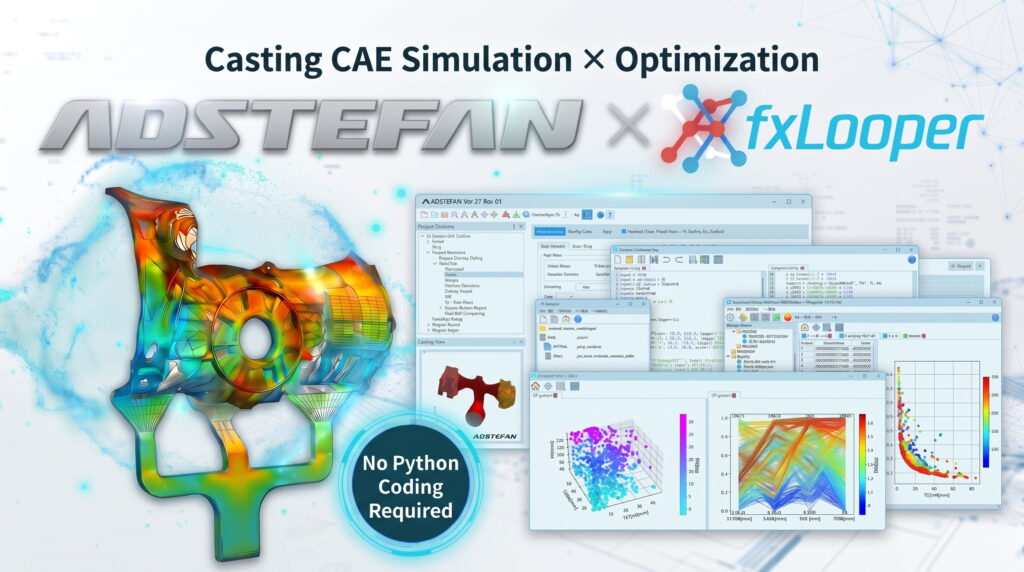
- With the increasing demand for Computer-Aided Optimization (CAO) in casting CAE simulation, end-to-end automation of design and analysis is drawing significant attention.
- While the general-purpose optimization software “fxLooper” provides powerful automated parameter searching, standalone deployment posed a barrier because it required Python programming.
- With the optimization integration feature in the casting simulation system “ADSTEFAN”, an intuitive dedicated GUI enables completely no-code (Python-free) configuration and execution.
- From automated exploration of shot sleeve injection parameters (low speed, high speed, and transition position) to riser/feeder geometry optimization, combined with intuitive visual evaluation via the “Data Analyzer”, it achieves both reduced development lead times and superior casting quality.
1. Trends and Traditional Challenges in Casting CAE Simulation Optimization (CAO)
In modern manufacturing, demands for higher quality, shorter lead times, and reduced production costs across various casting processes—such as high pressure die casting and gravity casting—continue to intensify. Traditionally, evaluating gating/risering systems and process parameters using casting CAE simulation relied heavily on iterative trial-and-error:
- CAE engineers manually modify the CAD geometry of risers, runners, and gates, or adjust injection and pouring parameters.
- Run fluid flow analysis and solidification analysis using casting CAE simulation software (such as ADSTEFAN).
- Visually inspect and evaluate simulation results (defect prediction, temperature distribution, air entrapment/gas volume, etc.).
- Rely on veteran experience and intuition to manually modify the next set of parameters and re-run the simulation.
However, this manual approach posed critical drawbacks: significant engineering overhead due to increased prototyping and simulation cycles, exploration scopes bounded by human intuition, and knowledge silos dependent on individual skill.
To overcome these bottlenecks, Casting CAE-based CAO (Computer-Aided Optimization) technology—where the computer automatically explores optimal geometries and process parameters—is gaining substantial traction.
2. Features and Implementation Barriers of General-Purpose Optimization Software “fxLooper”
What is fxLooper?
Developed by Anotherworker Inc., “fxLooper” is an advanced general-purpose optimization software that links with CAD/CAE tools to automatically explore optimal solutions across countless design variables.
Key Strengths and Benefits of fxLooper
- Intelligent Automated Search: Equipped with advanced exploration algorithms to efficiently narrow down optimal parameters within complex design spaces.
- Simultaneous Optimization of Geometry and Parameters: Enables concurrent optimization of geometric dimensions (length, thickness, draft angle) and process parameters (velocity, pressure, temperature).
- Flexible Integration with Major CAD/CAE Systems: Seamlessly interfaces with leading CAD platforms including SOLIDWORKS, FreeCAD, and Autodesk Fusion.
Challenge in Standalone Use: The “Python Barrier”
When running fxLooper as a standalone tool, users had to write and maintain Python scripts to automate tasks such as updating CAD parameters, executing CAE solvers, and extracting/tabulating output datasets. For foundry engineers and CAE specialists on the production floor, programming overhead and script maintenance formed a major barrier to adoption.
3. Innovation via ADSTEFAN’s “fxLooper Optimization Integration”: Fully No-Code / No Python Required

The solution to these challenges is the fxLooper Optimization Integration Feature (CAO Module) built directly into the casting simulation system “ADSTEFAN”.
Intuitive Optimization Setup via Dedicated ADSTEFAN GUI
ADSTEFAN features a dedicated GUI that natively links with fxLooper’s robust optimization solver under the hood.
User → [Write Python Code] → CAD / Parameter Updates → CAE Analysis → Result Evaluation
[ADSTEFAN Optimization Integration]
User → [Select Variables in ADSTEFAN GUI] → Fully Automated Optimization Loop!
Engineers do not need to write a single line of Python code. Simply select design variables and optimization objectives directly within the ADSTEFAN interface using mouse operations, and the automated optimization workflow executes in the background.
Key Features and Advantages
- 100% No-Code (Zero Programming Knowledge Required)
Eliminates scripting requirements, allowing both dedicated simulation analysts and frontline tool/die designers to leverage optimization simulation immediately. - Automated CAD Geometry Parameterization
Links with CAD platforms like SOLIDWORKS, FreeCAD, and Autodesk Fusion to automatically adjust geometric variables (e.g., riser dimensions, chill plate placement) throughout repeated simulation loops. - Flexible Objective Function Setup (Including Advanced Defect Prediction Tool “ADPT”)
In addition to air entrapment volume during fluid flow, air contact time, and shrinkage cavity indicators (such as Micro Porosity), the latest ADSTEFAN Ver.27 allows machine learning-based defect prediction results from ADPT to be defined directly as optimization targets.
4. Application Examples: Overcoming Casting Challenges via Simulation & Optimization
Combining ADSTEFAN and fxLooper automates floor-level trial and error, improving casting quality while substantially reducing engineering man-hours.
Case 1: Automated Optimization of Shot Sleeve Injection Parameters (Low Speed, High Speed, and Transition Point) in Die Casting
- Challenge & Background: In shot sleeve analysis for high pressure die casting, minimizing air entrapment (gas volume) into the cavity and reducing molten metal air contact time requires balanced tuning of three critical parameters: low shot speed, high shot speed, and the high-speed transition position. Manually finding the optimal combination through trial and error required extensive labor and time.
- Optimization Approach:
- Design Variables: Low shot speed, high shot speed, and high-speed transition position.
- Objective Functions (Evaluation Criteria): Minimize entrapped gas volume in the product cavity, and minimize molten metal air-contact time.
- Search Method: Define target variables within the ADSTEFAN GUI to automatically and efficiently explore parameter spaces.
- Results & Benefits: Running automated simulations overnight and over weekends successfully identified optimal injection parameters that drastically reduced air entrapment while strictly limiting air contact time—a balance difficult to pinpoint manually. Visualizing correlations from exploration data makes selecting the most practical shot profile for production standards straightforward.
Case 2: Optimizing Riser Geometry and Placement in Gravity Casting
- Challenge & Background: Determine the minimum riser volume and position required to eliminate shrinkage porosity in critical functional sections without lowering casting yield.
- Optimization Approach: Automatically update riser height and diameter in CAD (SOLIDWORKS, FreeCAD, etc.) to explore minimal riser volumes that prevent shrinkage porosity.
5. Post-Analysis: Intuitive Result Evaluation via “Data Analyzer”
Upon completing the optimization run in ADSTEFAN, the dedicated post-processing tool “fxLooper Data Analyzer” launches automatically, allowing engineering teams to efficiently identify the best manufacturing condition from comprehensive exploration datasets.
Core Analytical Capabilities
- Intuitive Parallel Coordinates Plot: Displays multi-parameter correlations on a single interactive chart. Dragging threshold bars on each axis filters viable design spaces instantly, highlighting matching shot profiles.
- Multi-Angle Data Evaluation (3D CG / Charts / Tables): Offers comparative data tables of design variables and resulting numerical values alongside interactive trend graphs and 3D CG representations of the geometry and defect distribution.
- Visualizing Trade-Offs: Clarifies Pareto trade-offs—such as reducing gas entrapment versus minimizing air contact time—enabling engineers to confidently select rational operating parameters aligned with machine capabilities and quality standards.
6. Conclusion: Accelerating the Future of Casting Engineering with ADSTEFAN × fxLooper
Computer-Aided Optimization (CAO) in casting simulation represents a major paradigm shift from experience-based manual iterations to intelligent, automated engineering design.
While standalone fxLooper historically required coding expertise, ADSTEFAN’s intuitive GUI enables seamless deployment with zero programming required. Companies looking to shorten development lead times, improve casting yield, and eliminate defects can rely on ADSTEFAN’s optimization integration.
Inquiries & Information Requests
To learn more about ADSTEFAN’s simulation capabilities or to discuss implementing optimization analysis (fxLooper integration), please feel free to reach out via our inquiry form or the live chat window at the bottom right of the screen.
 Casting Simulation System ADSTEFAN – Product Details